Record business calls on your office lines, your cell phones or a dedicated verification line. Recordings are stored securely in the cloud, ready to review for quality, training, compliance and disputes.
Pick the setup that fits how your team makes and takes calls, or combine them.
Recording built into Diamond Voice cloud phone service.
Add recording without changing carriers or numbers.
Third-party verification (TPV) recording for sales and contracts.
The simplest way to record all of your calls, all of the time, is to make recording part of your phone service.
Diamond Voice cloud phone service includes business call recording, with nothing extra to install.
Recordings your managers can actually use.
Keep your cell phone, your number and your carrier. Recordings are made by the Diamond Voice system and stored in the cloud, not on your phone.
A softphone app gives you a second line with recording built in.
The app runs on your phone’s data connection, cellular or Wi-Fi. If you are often in areas with weak coverage, the app-free options work just as well.
Use the call forwarding already built into your phone.
Dial one access number, then the number you want to call.
Option 1
Uses your phone’s conditional call forwarding. No app needed.
Option 2
Uses the softphone app, a Diamond Voice extension on your cell phone.
Need to record both incoming and outgoing calls? Cell phone call recording covers both, with easy setup and no long-term contract.
Record and document verbal contracts, with a secure audio record of every sales conversation, agreement and transaction.
Record live verbal contracts between your agent and the customer.
Standardize verification with automated questions and answers.
Designed around your requirements, with free consultation.
Your agents can transfer callers into Pay By Phone, a PCI compliant payment line, and get the call back when they’re done. Callers enter card numbers on their keypad, so no one on your team hears them and they are never spoken aloud on the call.
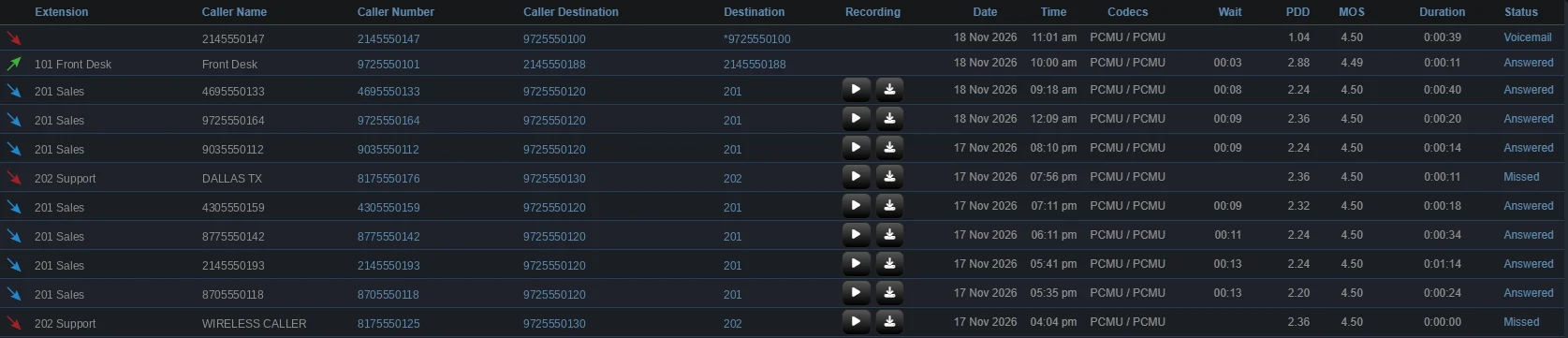
Recordings are kept on secure Diamond Voice servers, not on your phones.
Get a link to the recording at the end of every call.
Find, play and download recordings from any browser.
Play recordings back by phone, just like voicemail.
A call center outsourcer records hundreds of quality-test calls through one toll-free Virtual Phone Booth, with a PIN for each agent and no tones to alert the person called.
Read the case study →A transcription provider gives field agents a toll-free recording line that works from any phone, with unlimited capacity and web and database integration.
Read the case study →A dispute resolution firm records face-to-face meetings by dialing one number from a cell phone, then retrieves recordings from the web portal.
Read the case study →Calls are recorded when they pass through the Diamond Voice call recording system. On Diamond Voice cloud phone service, recording is built in and can be set to record automatically. For cell phones, calls reach the system through a softphone app, call forwarding or the Virtual Phone Booth access number, so you can keep your current phone and carrier.
Yes. Cell phone call recording works on top of the phone service you already have, which is why it is sometimes called an “over the top” solution. You keep your number, your phone and your carrier, and Diamond Voice records the calls you choose.
When you sign up, you are assigned a Diamond Voice recording number, and you set your phone’s conditional call forwarding to it. When a call comes in that you want recorded, press “Ignore” or “End Call.” The call forwards to Diamond Voice and rings straight back to your phone within a few seconds, with recording on. To take a call without recording it, just answer it as usual.
The call rings back from the Diamond Voice system number, 972-293-5300, so you know it is the recorded call and not a new one.
Use the Virtual Phone Booth. Dial your Virtual Phone Booth access number, or tap a speed dial icon on your home screen, then enter the number you want to call. Recording starts as soon as the call connects. You can show your cell number or another number, such as your office line, as your caller ID, and you can place recorded calls from almost any phone by logging in with your PIN.
No. You choose. With cell phone recording, only the calls you send to Diamond Voice are recorded. Business phone lines can be set up to record every call automatically.
With cell phone recording, the caller only hears ringing while the call is forwarded. If you are in a state where all parties must be told about a recording, let the caller know before you continue, or have the system play a message such as “For quality assurance and training purposes, this call may be recorded.”
Recording laws vary by state. Some states require only one person on the call to agree to the recording, and others require everyone on the call to agree. Please talk with your legal counsel about how you plan to record and use your calls.
Recordings are made by the Diamond Voice system and stored securely in the cloud, not on your phone. You can get an email link at the end of each call, listen to and download recordings in the web portal, and, with the Virtual Phone Booth, play them back by phone like voicemail.
TPV recording documents a verbal agreement between your agent and a customer. The system asks for the agent ID and customer number, records the agreement and gives a confirmation number. Choose open-ended recording, or a pre-scripted line that asks your customer a series of questions and records audio or keypad answers.
Some carriers count forwarded calls as airtime, others charge a flat rate, and some do not charge at all. Please check with your cell provider.
No. Cell phone call recording and third-party recording plans have no long-term contract.
Business call recording plans start at $24.95 a month for 500 minutes, and third-party recording plans start at $39.95 a month. See call recording pricing and third-party call recording pricing.
Tell us how your team makes and takes calls, and we’ll recommend the right setup. You can also reach us at 888-293-1550.
Get started